Laser Cut Bear Template SVG Multi Use – Creative Possibilities Unleashed
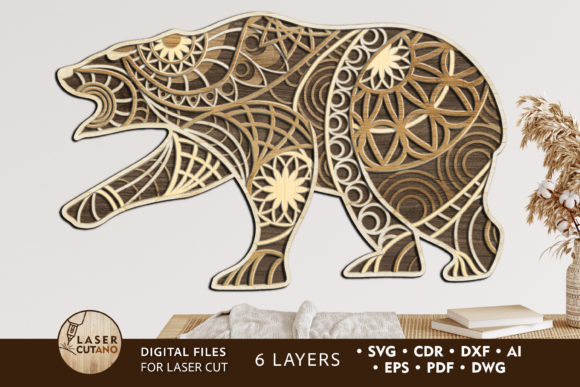
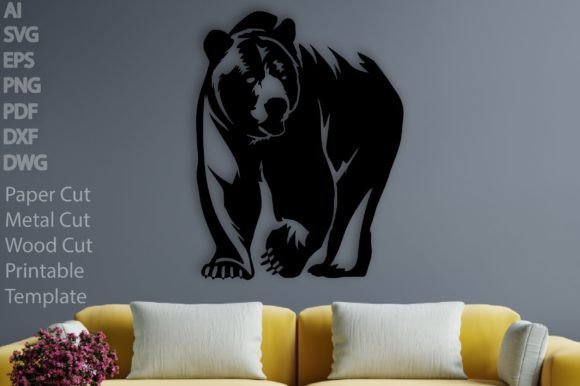
The Laser Cut Bear Template SVG Multi Use is a digital design file that offers incredible versatility for creative projects. Whether you're an artist, designer, hobbyist, or entrepreneur, this template can be the perfect foundation for bringing your vision to life. The bear motif is both classic and modern, making it suitable for a wide range of applications—from minimalist wall art to bold t-shirt graphics. Its clean lines and seamless circuit-like design lend themselves well to laser cutting, ensuring precision and ease of use across different materials and formats.
Why This Laser Cut Bear Template Stands Out
What makes the Laser Cut Bear Template SVG Multi Use special is its thoughtful design and comprehensive file format support. It’s not just another animal SVG; it's engineered for clarity and adaptability. The circuit-based aesthetic adds a unique twist to the traditional bear silhouette, allowing it to blend seamlessly with both modern and rustic decor styles.
This template is especially valuable because it includes seven high-quality file formats: SVG, AI, EPS, DXF, DWG, PDF, and PNG (300ppi with transparent background). These files are scalable without quality loss, easy to edit, and compatible with most design software and laser cutting machines. No more worrying about distorted images or complicated layering—this template is designed for hassle-free creativity.
Exploring the Many Uses of the Laser Cut Bear Template
The beauty of the Laser Cut Bear Template SVG Multi Use lies in its flexibility. Here are some real-world applications where this design shines:
- Metal Wall Decor: Use the SVG to cut through metal sheets for a durable and stylish addition to any room. A laser-cut bear on brushed steel or copper can add a touch of elegance to a living space or office.
- Home Decoration: Transform the design into wooden wall art or framed prints. The bear’s simplicity allows it to complement various interior themes, from farmhouse to contemporary.
- Wall Signs: Create custom signs using acrylic or wood. With its clear and defined shape, the bear becomes a focal point that can represent a brand, a personal message, or even a seasonal theme.
- Interior & Outdoor Hangings: Craft lightweight hangings from materials like MDF or aluminum. These can be used as wind chimes, mobiles, or simply decorative pieces that catch the light and eye.
- Minimalist Art: The clean geometry of the design fits perfectly within the minimalist movement. Use it as a standalone piece or part of a larger gallery wall.
- T-Shirt Design: Convert the vector into a print-ready graphic. Whether heat pressed or screen printed, the bear adds personality to apparel without overwhelming the design.
- Paper Cuts: Ideal for card making, scrapbooking, or paper crafts. The intricate yet simple circuit pattern ensures each cut looks intentional and professional.
Creative Ideas to Inspire Your Projects
If you’re looking for inspiration beyond the basics, here are some project ideas that highlight the potential of the Laser Cut Bear Template SVG Multi Use:
1. Custom Branding with a Personal Touch
Entrepreneurs and small business owners often seek ways to differentiate their brand visually. Incorporating the bear into signage, product packaging, or promotional items can create a memorable identity. For example, a boutique could feature the bear on a wooden sign above the entrance, while a coffee shop might use it on mugs or coasters.
2. Educational Crafts for Kids
Educators and parents can use this template to engage children in hands-on learning. Laser cutting the bear onto thick cardstock or foam board allows kids to paint, color, or assemble parts. It also introduces them to basic design concepts and tools in a safe, interactive way.
3. Modern Wedding Invitations or Accessories
Wedding planners and designers might find the bear useful in creating unique invitations, table numbers, or aisle decorations. By combining the circuit design with floral motifs or monograms, the template can be adapted to suit a variety of wedding themes, from tech-inspired to nature-themed events.
4. Eco-Friendly Home Accents
With a growing interest in sustainable design, the bear can be crafted from reclaimed wood, bamboo, or recycled metal. These eco-conscious versions can become conversation starters and reflect a commitment to green living.
5. Corporate Gifts and Promotional Merchandise
Freelancers and marketers can offer the bear as a branded item for corporate clients. Think engraved keychains, desk organizers, or magnetic fridge accessories. The design’s adaptability means it can be tailored to fit a company's logo or colors effortlessly.
How Different Users Can Adapt the Design
Every user has a unique context and goal, so the Laser Cut Bear Template SVG Multi Use can be customized in many ways:
For Artists and Hobbyists
Artists can experiment with color palettes, layering techniques, or mixed media. Try etching the bear onto glass, painting it with metallic finishes, or combining it with other SVG elements to build a narrative scene. The circuit pattern can also serve as a base for adding textures or patterns using engraving or fill effects.
For Business Owners and Marketers
Businesses can integrate the bear into their visual branding. Add it to social media headers, website banners, or even as a subtle watermark in marketing materials. The SVG format ensures that it looks sharp at any size, which is crucial for online visibility and print collateral.
For Educators and Event Planners
Event planners can use the template to create thematic décor, such as a bear-shaped welcome sign or directional markers for a festival or retreat. Teachers might use it in STEM lessons to demonstrate how vector graphics work or in art classes to teach laser cutting techniques.
For Bloggers and Content Creators
Bloggers focused on DIY, home decor, or lifestyle content can showcase the bear in tutorials, reviews, or photo essays. The PNG and PDF files make it easy to embed visuals directly into articles or presentations, enhancing engagement and usability for readers.
Practical Tips for Using the Laser Cut Bear Template
To get the most out of the Laser Cut Bear Template SVG Multi Use, consider these practical suggestions:
- Choose the Right Format: If you're working in Adobe Illustrator, use the AI or EPS files. For laser cutting, SVG and DXF are ideal due to their scalability and compatibility. Always match the file type to your workflow needs.
- Test Material Thickness: Before mass production, test the design on a few sample materials to ensure the laser settings are optimized. This helps avoid burn marks or incomplete cuts.
- Layer and Combine: Don’t hesitate to combine the bear with other SVGs. Layering it with geometric shapes, text, or abstract patterns can lead to stunning results.
- Use Transparent Backgrounds for Digital Projects: The PNG files with transparent backgrounds are perfect for web use, app icons, or digital collages. They allow the bear to stand out without a distracting background.
- Respect Copyright and Licensing: Since this is a downloadable file, always check the licensing agreement before using it commercially. Proper attribution or usage rights help maintain your credibility and legal standing.
Designing for Audience and Context
Understanding your audience is key when adapting the Laser Cut Bear Template SVG Multi Use. For instance:
- A minimalist design blog might prefer the bear in black and white, focusing on form and negative space.
- A children's toy store could add playful colors and whimsical elements around the bear to appeal to younger customers.
- An urban café may want the bear in a metallic finish to match its industrial vibe.
Each variation maintains the core design but shifts tone, style, and function based on the intended use. This adaptability is what makes the template so powerful—it invites creativity while staying grounded in usability.
Ensuring Quality and Consistency in Your Output
Whether you're printing, cutting, or designing digitally, consistency and clarity are essential. Here’s how to keep your final products looking polished:
- Align Layers Correctly: If you’re using multiple layers (e.g., for color separation), double-check alignment to avoid misprints or mismatched cuts.
- Optimize File Settings: When exporting or importing SVG files, ensure they’re correctly scaled and all paths are closed. This prevents errors during laser cutting or printing.
- Keep It Simple: The bear’s design is elegant by nature. Avoid overcomplicating it with too many details unless it serves a specific purpose, like storytelling or educational value.
- Experiment with Color: While the original design is in grayscale, don’t be afraid to play with color in digital applications. Use gradients or flat colors depending on your platform and preference.
Where to Start: Quick Project Ideas
If you're new to using SVG templates or laser cutting, here are three beginner-friendly projects to try:
- Wooden Wall Hanging: Print the template onto a thin sheet of wood, cut it with a laser, and hang it in your space. You can stain the wood for a warm look or leave it natural for a modern feel.
- Custom T-Shirts: Open the SVG in a design tool like Cricut Design Space or Adobe Illustrator. Resize it, add complementary text or logos, and print it on cotton tees using a heat press or screen printer.
- SVG Sticker Set: Use the PNG file to create vinyl stickers. Apply them to laptops, water bottles, or notebooks for a quick personalization that stands out.
Final Thoughts
The Laser Cut Bear Template SVG Multi Use is more than just a file—it's a canvas for imagination and innovation. Its clean, circuit-inspired design opens the door to countless adaptations, whether you're crafting something for home, business, or personal expression. With seven versatile file formats and a straightforward structure, it’s built for both beginners and professionals who want to explore the intersection of art and technology.
So go ahead—experiment, customize, and bring your own twist to this timeless design. And remember, every project starts with a single idea. Let the Laser Cut Bear Template SVG Multi Use spark yours.
Please love, follow, and review if this resource inspires your next creation. Thank you for being part of our creative community!