Layered Letter T, Layered Letters SVG: A Guide to Choosing and Using Multilayer Mandala Designs for Laser Cutting
Layered Letter T designs are becoming increasingly popular among laser cutting enthusiasts, designers, and crafters. These intricate, multilayer mandala letter templates offer a unique way to incorporate typography into decorative art while maintaining structural integrity and visual appeal. Specifically, the Layered Letter T, Layered Letters SVG format is ideal for those who want to create stunning, three-dimensional letters using CNC or laser cutting machines. This digital product includes multiple file formats such as CDR, EPS, DXF, DWG, SVG, AI, and PDF in one downloadable ZIP file, making it versatile and accessible across different design platforms.
Understanding Layered Letters and Their Purpose
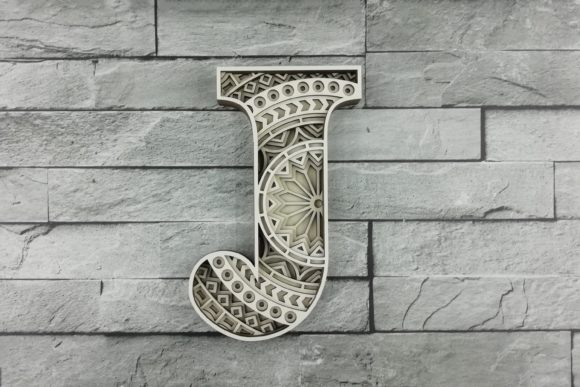
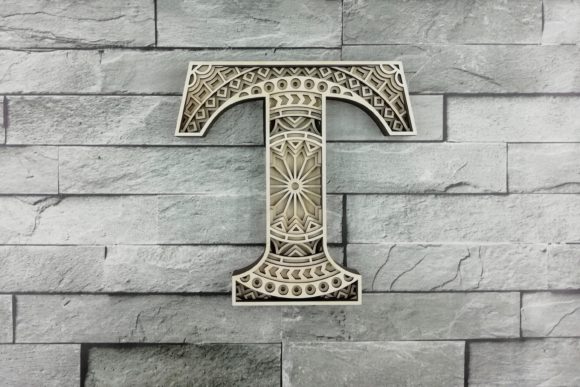
A layered letter is a design that uses several layers of material stacked together to form a single, cohesive letter shape. Each layer contributes to the overall depth and detail of the final piece. In the case of the Layered Letter T, the design features six distinct layers, allowing for a rich, multidimensional appearance when cut from materials like wood, acrylic, MDF, or even paper.
The height of the mandala-style letter T is 180 mm (approximately 7.1 inches), but it can be scaled up or down depending on your project needs. The scalability makes this template suitable for both small-scale personal crafts and large commercial installations. When you scale the design, it's important to ensure that the smallest details remain visible and intact—especially since subtle elements often define the elegance of a mandala pattern.
Why Choose Multilayer Mandala Letters?
- Visual Impact: The mandala style adds artistic value, making the letter T not just a symbol but a statement piece.
- Professional Quality: Designed with precision, these templates allow for clean, accurate cuts on modern laser or CNC machines.
- Time Efficiency: Pre-designed and formatted for immediate use means less time spent on setup and more on execution.
- Material Versatility: Works well with panel plywood, acrylic, wood, MDF, plexiglass, plastic, and paper, giving users creative freedom.
- Instant Access: As a digital product, you receive immediate download access after payment—no waiting for shipping or delays.
Common Mistakes and Misunderstandings
While the Layered Letter T offers many advantages, there are some common pitfalls that users may encounter when choosing or applying this type of design. Here are a few key issues to be aware of and how to avoid them:
Misjudging Material Thickness
One frequent mistake is not considering the thickness of the material being used. Since the design has six layers, each must fit snugly with the next. If the layers are too thick, they won't align properly; if they're too thin, the structure might look flat or lose its intended dimensionality.
Advice: Always measure the thickness of your chosen material before starting. Use a caliper for accuracy and adjust the spacing between layers accordingly in your design software. For example, if you're working with 3 mm MDF, ensure each layer’s depth allows for proper stacking without gaps or compression.
Overlooking Scalability Constraints
Many users assume that scaling a design is always straightforward. However, shrinking a complex mandala like the Layered Letter T can cause fine details to disappear or become misaligned. Conversely, enlarging the design beyond the machine’s capacity can lead to inaccuracies or failed cuts.
Example: If you scale the design down by half for a smaller sign, make sure the thinnest lines in the SVG still register correctly in your laser cutter settings. A better approach is to test the design at a reduced scale first using a scrap material to verify the results.
Ignoring File Format Requirements
Having all the necessary file types included—CDR, EPS, DXF, DWG, SVG, AI, and PDF—is a huge benefit, but it's easy to overlook which format works best with your specific software or machine. Not all programs support every vector format equally, so assuming compatibility can lead to frustration and wasted time.
Tip: Check the recommended file type for your laser cutting software. For instance, if you're using CorelDRAW, open the CDR file directly for full editing control. If you're using Adobe Illustrator, the AI or SVG files will give you the most flexibility. Always preview the design in your preferred program before sending it to the machine.
What You Should Check Before Proceeding
To get the most out of your Layered Letter T purchase, here are a few essential checks to perform before downloading or beginning your project:
- Machine Compatibility: Ensure your laser or CNC machine supports the file types provided and can handle multi-layer projects. Some machines require separate layers to be exported individually for engraving or cutting.
- Design Preview: Open the SVG or PDF file to review the layout. Make sure the alignment looks correct and the layers appear balanced. If anything seems off, contact the seller for clarification before proceeding.
- Layer Spacing Settings: Confirm whether the design already includes spacing between layers or if you need to manually add it based on your material thickness. Most vector files do include spacing, but it's worth double-checking.
- License Agreement: Understand the terms of use. Is the design for personal or commercial use? Can you modify it? Knowing these details helps prevent legal issues later on.
Better Approaches for Successful Projects
Instead of rushing into the first project you see, take a moment to plan how you'll use the Layered Letter T. Here are a few realistic strategies for maximizing your investment:
Test First, Cut Later
Before cutting the final pieces, print a small version of the design or use a low-cost material like foam board or thin cardboard. This lets you visualize the outcome and spot any potential alignment or detail issues early on.
Optimize Your Workflow
Organize your workflow by separating the layers into individual files. This makes it easier to apply different finishes or colors to each layer, especially if you're planning to paint or stain the final product. For example, painting the outermost layer a darker shade and leaving inner layers lighter can enhance the visual depth.
Use Proper Software Tools
Not all vector editing software handles layer separation and nesting the same way. Programs like Adobe Illustrator or CorelDRAW provide robust tools for managing multiple layers and adjusting their positions precisely. If you're using free software, check if it supports nested layers and path optimization for laser cutting.
Choosing the Right Material for Laser Cutting
Another area where mistakes commonly occur is in material selection. While the Layered Letter T can technically work with various materials, the choice significantly impacts the final result.
Plywood vs. Acrylic: Plywood gives a warm, natural look and is great for indoor displays. Acrylic, on the other hand, offers a polished, transparent finish and is ideal for signage or wall art. Both materials require different laser settings, so always follow manufacturer guidelines.
Wood Considerations: Hardwoods like oak or maple may burn slightly during cutting, whereas softer woods like basswood or balsa tend to cut cleaner. For layered designs, softwood is generally preferable due to its ease of handling and smoother surface.
Plastic and MDF: Plastic can melt or warp if the laser isn’t calibrated correctly. MDF is affordable and cuts cleanly, but it may release dust during the process. Always work in a well-ventilated area and wear protective gear when necessary.
Realistic Examples and Applications
Here are a few ways the Layered Letter T can be applied effectively:
- Wall Art: Stack the six layers onto a backing board and hang it as a focal point in your home or office. Adding LED lighting behind the layers can elevate the presentation.
- Custom Signage: Use the scalable nature of the design to create a large entrance sign or branding element for a business. Multiple T-shaped signs could be arranged in a logo formation.
- Gifts and Decor: Craft personalized gifts like engraved wooden coasters or decorative boxes with the letter T incorporated into the lid or base.
- Educational Tools: Teachers or educators can use the layered design to demonstrate geometric patterns, symmetry, and the principles of layering in design classes.
How to Evaluate the Design Before Purchase
Before buying the Layered Letter T digital product, evaluate what you’re getting:
- Are all six layers clearly defined and labeled within the file?
- Is the design symmetrical and centered properly for consistent cutting?
- Do the included file formats match your workflow and equipment?
- Does the template come with instructions or notes for customization?
- Can you easily adjust the spacing between layers if needed?
These factors help ensure the design meets your expectations and technical requirements. Many creators also appreciate the inclusion of a PDF version for quick reference when setting up their machine or planning color schemes.
Conclusion: Making Smart Choices with Layered Letter T Templates
The Layered Letter T, Layered Letters SVG offers a compelling blend of artistry and functionality for laser cutting projects. With careful consideration of material, machine settings, and file formats, you can avoid common mistakes and produce high-quality results that reflect your creativity and skill.
By understanding the nuances of multilayer mandala designs and following practical advice, you’ll be able to use this digital template confidently and efficiently. Whether you're a beginner exploring new techniques or a professional looking to expand your portfolio, the right preparation makes all the difference in achieving success with your layered letter projects.